

MENU


With over 20 years of experience as a Registered Nurse and Acute Care Nurse Practitioner, I have witnessed the shortcomings of the healthcare system in addressing women's needs. Frustrated by the limitations imposed by insurance, I founded Reforme Wellness to offer meaningful care that targets the root causes of women’s health issues.
Hi, I’m Jolie!
Explore Categories
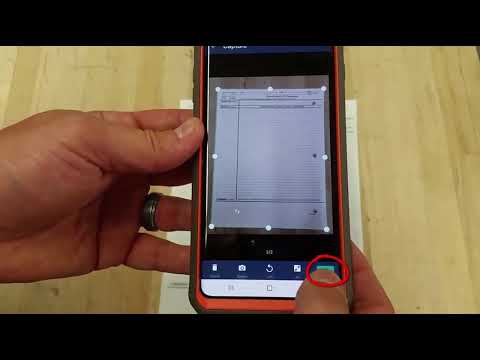
Sending a fax used to require a dedicated machine, phone line, and a stack of paper. An online fax service replaces that hardware with a cloud‑based platform that lets you transmit a fax directly from a computer, smartphone, or tablet. The process works over the internet, so you can send or receive faxes wherever you have a reliable connection.
For U.S. businesses, this shift is especially relevant because many industries still rely on fax for legal documents, medical records, or contract signatures. By moving fax to the cloud, companies reduce postage costs, eliminate paper waste, and gain faster delivery times while staying compliant with regulations such as HIPAA.
Small‑to‑medium enterprises that handle occasional documents—like invoices, purchase orders, or client agreements—often find traditional fax machines too costly to maintain. Online fax gives them a professional edge without the overhead of hardware.
Large organizations in healthcare, law, and finance also use online fax to meet strict security standards while enabling remote workers to access fax capabilities from any device. Even freelancers and solo entrepreneurs can benefit when a client requests a faxed signature.
When you upload a document (PDF, Word, or image) to an online fax platform, the service converts the file into a fax‑compatible format and routes it through a virtual phone number to the recipient’s fax machine. The entire transmission is logged, and you receive a confirmation email or dashboard notification once the fax is successfully delivered.
Most providers offer a web portal, desktop client, and mobile apps, giving you the flexibility to send faxes from any environment. The service also handles inbound faxes, delivering them to your email inbox or secure account for easy storage and retrieval.
These features ensure that the service does more than just move paper; it becomes part of your broader document workflow. Evaluate each feature against your business needs to avoid paying for capabilities you’ll never use.
Understanding these scenarios helps you decide which plan and feature set align with your most frequent faxing activities.
Start by comparing a few reputable services. Look for transparent pricing, a free trial, and the ability to add multiple users under one account. Make sure the provider offers the features highlighted earlier.
After signing up, you’ll typically need to confirm a phone number or email address. Some services also require a credit card on file to activate outbound fax capabilities. Verification helps prevent spam and ensures reliable delivery.
Download the mobile app for iOS or Android if you plan to fax from a phone, and install any optional desktop client for bulk sending. Most platforms also let you fax directly from a web browser, so installation is optional.
Once everything is set up, test the workflow by sending a sample fax to a personal fax number or a friend’s machine. Confirm that you receive the delivery receipt before using the service for critical documents.
Online fax providers typically offer three pricing structures: a free tier with limited pages, a pay‑per‑page model, and a subscription plan with a set number of pages per month. Evaluate your average monthly fax volume to choose the most cost‑effective option.
| Plan Type | Monthly Cost | Included Pages | Extra Page Rate | Best For |
|---|---|---|---|---|
| Free | $0 | 5 inbound / 3 outbound | $0.10 | Occasional personal use |
| Pay‑per‑Page | None (pay as you go) | 0 | $0.08 | Irregular fax bursts |
| Standard Subscription | $19.99 | 100 inbound / 200 outbound | $0.05 | Small‑to‑medium businesses |
| Premium Enterprise | $49.99 | Unlimited | Included | High‑volume organizations |
When budgeting, consider not only the per‑page cost but also any add‑on fees for extra numbers, priority support, or advanced security modules.
Because faxes often carry sensitive data, choose a provider that encrypts files both at rest and in transit. Look for certifications such as SOC 2 or ISO 27001, which indicate strong security practices.
Reliability is measured by uptime guarantees and delivery success rates. A reputable service will publish an SLA (service‑level agreement) promising at least 99.9% uptime and will offer a dashboard that tracks each fax’s status in real time.
Modern businesses can streamline workflows by linking their fax service to CRM, ERP, or document‑management platforms. Common integrations include Salesforce, Microsoft 365, and Zapier, enabling automatic routing of incoming faxes to the appropriate folder or record.
Automation features like scheduled fax sending or batch uploads can save time for departments that send dozens of documents daily. Verify that the provider’s API documentation is clear and that support is available for custom development.
When you encounter a delivery issue or need help setting up a new user, responsive support is essential. Look for providers that offer 24/7 live chat, phone assistance, and a searchable knowledge base.
Check reviews for response times and the quality of technical guidance. Some services also provide a dedicated account manager for enterprise plans, which can be valuable for onboarding and ongoing optimization.
Ready to move your faxing processes to the cloud? Explore reputable options and start a free trial to see how easy it can be to send fax online securely and reliably.
Explore our personalized programs and start your journey to a vibrant, healthy life today!

SEE HOW WE CAN HELP


